
Hiring always looks simple from the outside.
Write a job post. Collect resumes. Interview the best people. Make an offer.
Then real life shows up.
A resume lands in your inbox. Another comes through LinkedIn. A third gets forwarded by a hiring manager. Notes live in a spreadsheet. Interview feedback sits in Slack. One candidate gets a fast reply. Another gets forgotten for six days. Nobody is fully sure who owns the next step.
At that point, you are not really hiring.
You are doing document control.
That is why an applicant tracking system matters.
Not because software is exciting.
Not because “digital transformation” sounds impressive.
Because manual hiring gets messy, inconsistent, and expensive very quickly.
If you are trying to understand what an applicant tracking system is, how an ATS works, whether your team actually needs one, and how to choose the right ATS without buying bloated software you regret later, this guide is for you.
What is an Applicant Tracking System?
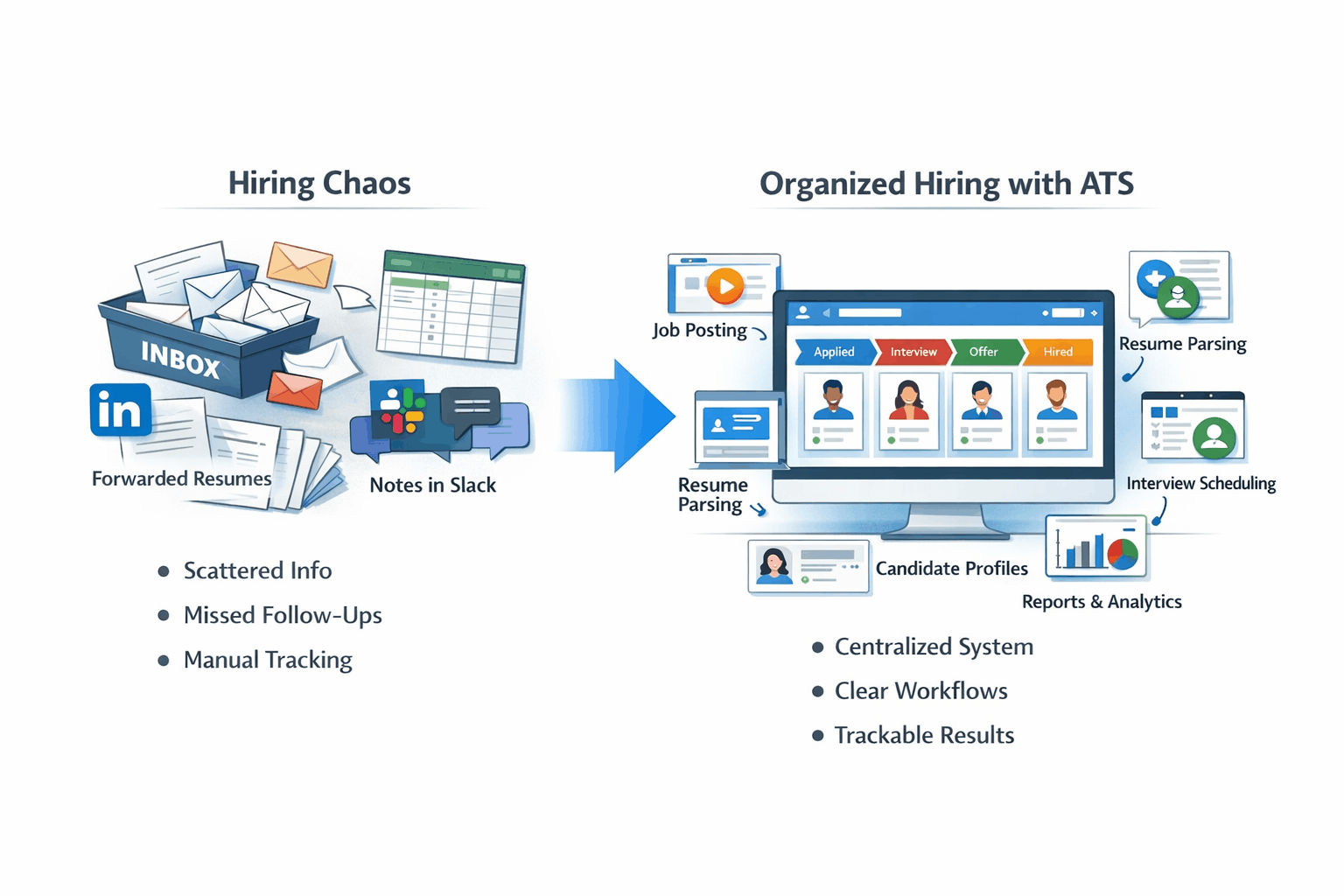
An applicant tracking system, or ATS, is software that helps companies manage hiring in one place.
In plain English, it is the tool that stores applicants, organizes resumes, tracks where every candidate is in the process, and keeps your hiring team from working out of ten scattered places at once.
A good ATS does not just “hold resumes.” It gives you one hiring workspace. Jobs get posted there. Applications land there. Candidate profiles live there. Notes, stages, emails, and pipeline visibility live there too.
The most useful way to think about it is this:
An ATS is part hiring database, part workflow engine, part communication hub.
Older systems were closer to digital filing cabinets. Modern ATS software is expected to do much more. It can post jobs, parse resume data, organize candidates, support workflows, enable collaboration, and give you reporting on what is actually happening in your hiring funnel.
How an ATS works
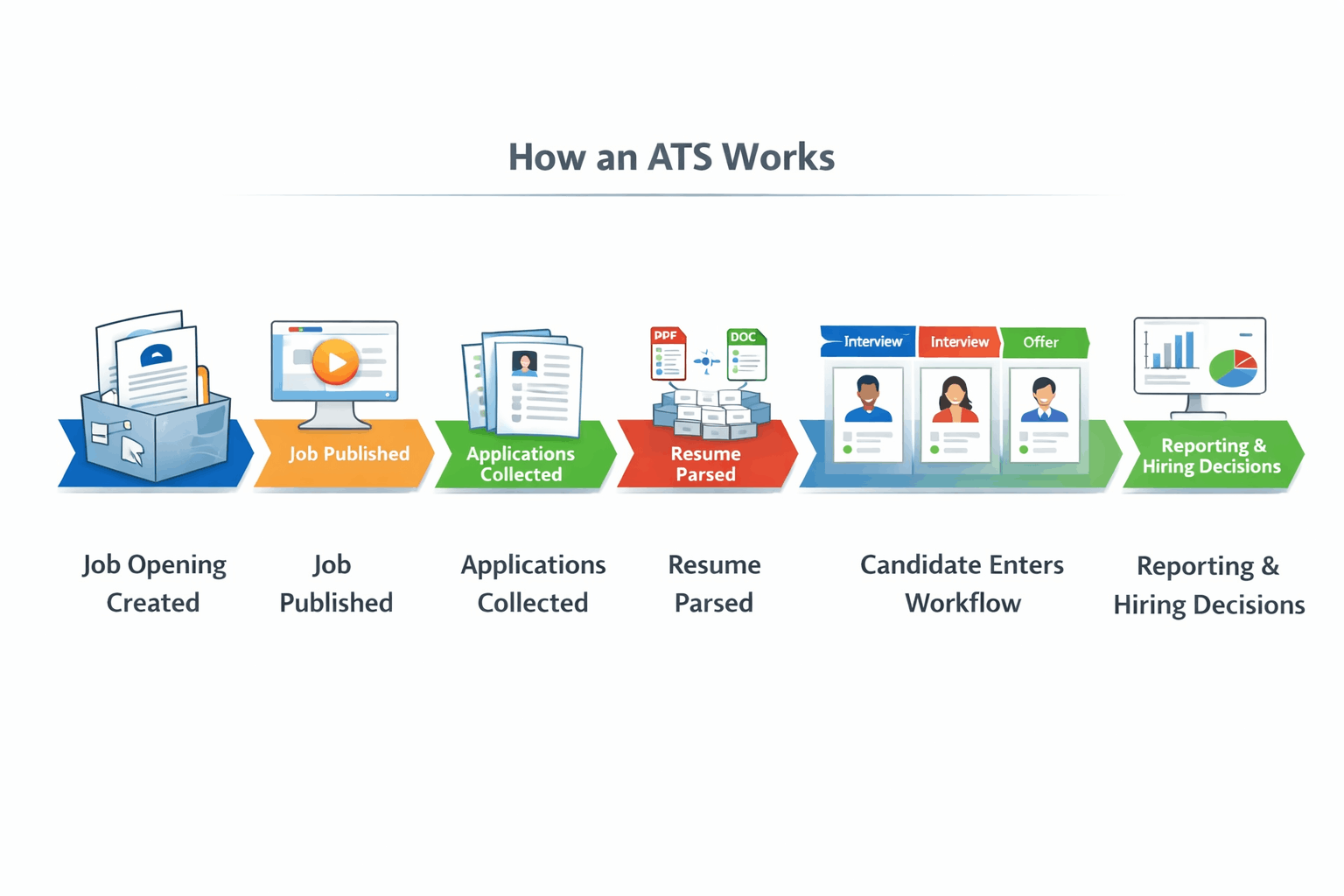
Most applicant tracking systems follow the same basic flow.
First, someone creates a job opening.
That role gets a title, description, location, requirements, and usually a defined hiring pipeline.
Then the job is published.
Instead of manually copying the same role into multiple places, many ATS tools let you post to your careers page and distribute the opening to job boards from one place. That sounds minor until you do it manually ten times in a row.
Then applications start coming in.
Candidates apply through your site, a job board, a referral flow, or an imported resume source. Instead of getting scattered across inboxes and folders, they land inside the system.
Then comes resume parsing.
This is where the ATS reads the resume and tries to extract structured information like name, contact details, job history, education, dates, and skills. That turns a PDF or Word document into something your team can search, filter, and sort more easily.
After that, the candidate gets stored in the database and moved into a workflow.
Maybe they begin in “Applied.” Then move to “Phone Screen.” Then “Interview.” Then “Final Round.” Then “Offer” or “Rejected.”
That sounds basic, but it changes everything.
Now everyone can see what stage a person is in, what happened last, and what needs to happen next.
Then communication and scheduling happen around that workflow.
Emails, interview invites, notes, reminders, and status updates become part of one trackable process instead of a loose chain of one-off actions.
Finally, reporting becomes possible.
You can see how many applicants came in, where they came from, where candidates are dropping off, and how long roles are taking to fill.
That is how an ATS works when it is doing its job right.
Not as some mysterious robot judge.
As a system that keeps hiring organized.
Why companies use an ATS
Most companies do not buy ATS software because they love software.
They buy it because hiring without one starts to break.
Here are the real reasons teams switch:
Less manual admin. Hiring teams lose huge amounts of time to administrative work. An ATS reduces the constant copying, chasing, updating, and checking that turns recruiting into paperwork.
Faster hiring. When roles are tracked in one place and follow-ups are not slipping through cracks, hiring usually moves faster.
Fewer dropped candidates. Good applicants do not only disappear because competitors move faster. They also disappear because your team forgets to follow up, loses visibility, or lets the process drag.
Better team visibility. Recruiters, founders, HR, and hiring managers all need to know what is happening without chasing each other for updates.
Cleaner communication. Templates, message history, and stage-based workflows make the process feel more consistent for both the team and the candidate.
Better reporting. If you want to know which source performs best or where candidates get stuck, you need more than inbox memory and spreadsheet guesses.
What happens when you don’t use an ATS?
This is the part a lot of teams underestimate.
Without an applicant tracking system, resumes get scattered.
Follow-up becomes inconsistent.
Stage ownership gets fuzzy.
Reporting becomes unreliable.
Good candidates fall through cracks for reasons that have nothing to do with fit.
That is why even smaller teams eventually hit a wall with manual hiring.
Core ATS features that actually matter
A lot of ATS buying guides throw fifty features at you and call it value.
That is not how buyers think.
Most people care about whether the tool removes friction from real hiring work.
These are the ATS features that usually matter most:
Job posting and distribution. You should be able to create a role once and push it to the right places without manual repetition.
Resume parsing. If the ATS cannot turn resumes into usable profiles, your database gets messy fast.
Centralized candidate database. This is one of the main reasons to use an ATS. You need one searchable system of record, not resumes floating between inboxes and folders.
Candidate workflows and pipelines. Every serious ATS should let you move candidates clearly through stages and show what happens next.
Tagging and filtering. Once you are hiring across multiple roles, clients, or recruiters, this becomes essential.
Interview coordination. Even a lightweight scheduling layer saves time and prevents avoidable confusion.
Email communication and templates. Helpful for consistency, speed, and keeping a record of candidate communication.
Reporting and analytics. Enough to answer practical questions, not just decorate a dashboard.
Careers page or job portal. Candidates need a clean, direct place to apply.
CRM-style relationship features. Especially useful for staffing agencies and proactive recruiters who want to nurture talent pools, not just process inbound applicants.
ATS vs spreadsheets
Spreadsheets can work for very light hiring.
For a little while.
Then they start becoming unreliable in the exact ways that hurt hiring most.
Someone forgets to update a row. Someone keeps interview notes elsewhere. Someone changes a status label. Someone emails a candidate without logging it.
Now your spreadsheet is no longer the truth. It is just one partial version of the truth.
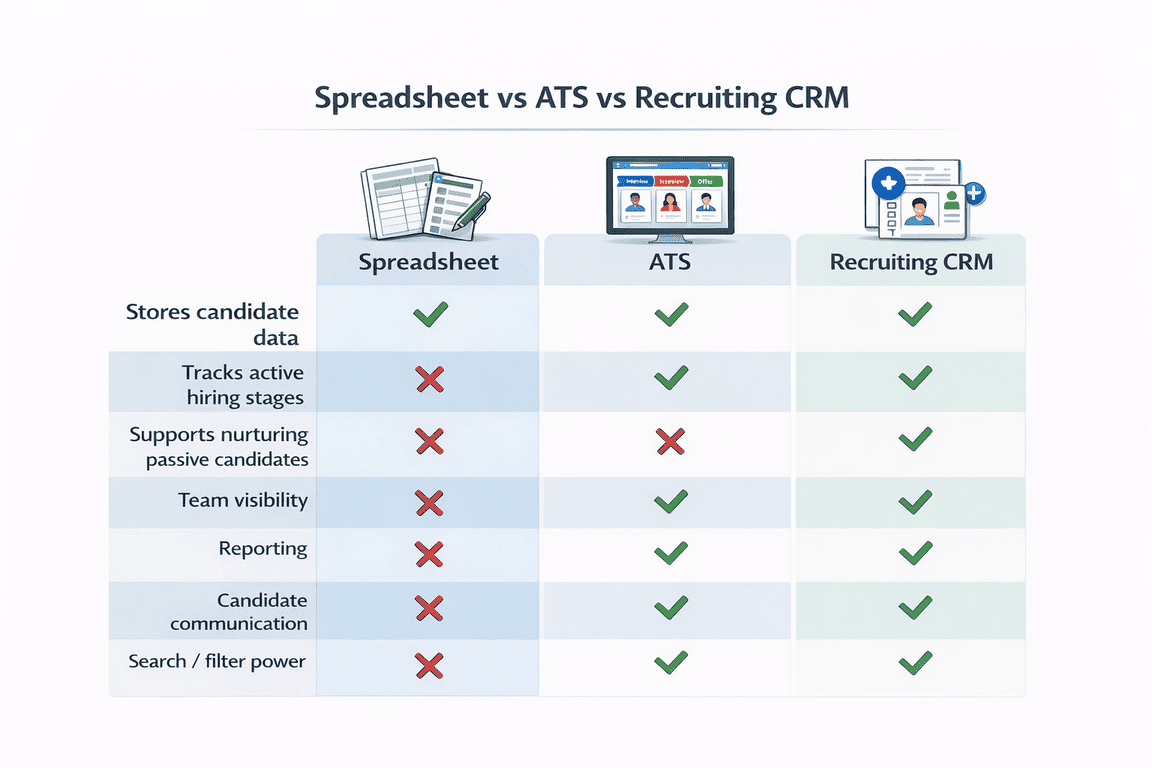
A spreadsheet stores data.
An ATS manages a process.
That is the real difference.
ATS vs CRM
An ATS and a recruiting CRM are related, but they are not the same thing.
An ATS is mainly built to manage applicants and hiring workflows.
A recruiting CRM is more focused on relationship-building over time: sourcing, nurturing, re-engaging past candidates, and keeping warm talent pools alive.
Some platforms blur the line.
That is useful. But the distinction still matters.
If most of your hiring is reactive, meaning candidates apply and you process them, ATS capability is usually the main need.
If your team lives off outbound recruiting, agency relationships, or long-term candidate nurturing, CRM-style features matter a lot more.
For many staffing firms, the sweet spot is a practical ATS with enough CRM behavior to support recruiter workflow without becoming a bloated enterprise suite.
We wrote a full guide on ATS vs. CRM if you’re interested in reading more!
Types of ATS
Not every ATS is built for the same buyer.
ATS for small business
Small businesses usually want simplicity, speed, and control.
Not a six-month rollout.
Not enterprise governance theater.
Just a system that helps them post jobs, track applicants, keep communication clean, and stop losing visibility.
For a complete breakdown on ATS for small businesses – read this article.
ATS for startups
Startups usually care about affordability, flexibility, and room to grow.
They may not be hiring at enterprise volume, but every hire matters more. A startup ATS should be easy to adopt now without becoming too limiting later.
Full guide: ATS for Startups.
ATS for staffing agencies
This is a different animal.
Agencies often need stronger search, faster submissions, recruiter collaboration, and relationship management. They may also care more about candidate presentation, which is where something like iReformat can become relevant as a support layer for resume standardization and polish rather than a replacement for the ATS itself.
Full guide: ATS for staffing agencies.
ATS for larger or enterprise teams
Larger teams care more about permissions, approvals, integrations, governance, consistency across departments, and deeper reporting.
That does not automatically make enterprise software better.
It just means the buying criteria shift.
Standalone ATS vs ATS inside broader HR software
A standalone ATS is usually more hiring-focused.
An ATS inside a broader HR suite may help centralize more of the employee lifecycle, but sometimes at the cost of depth or ease in recruiting workflows.
There is no universal winner here.
It depends on whether your priority is specialized recruiting execution or broader system consolidation.
How much does an ATS cost?
ATS pricing looks simple until you actually start comparing vendors.
Common models include:
Per-user pricing, where you pay based on the number of recruiters or seats
Tiered pricing, where plans increase based on features, usage, or team size
Custom quote pricing, usually for larger teams or more complex setups
What drives cost up?
More users
More integrations
More advanced workflows
Deeper reporting
Agency-style needs
Higher support expectations
Implementation complexity
And this part matters:
Cheap is not always cheap.
A lower sticker price can still cost you more if the product is clunky, hard to adopt, missing key workflow features, or forces your team into constant manual workarounds.
For small businesses and startups, the better question is usually not:
What is the cheapest ATS?
It is:
What is the least painful system that gives us visibility, repeatability, and enough room to grow?
How to choose the right ATS
This is where buyers usually get stuck.
Because many applicant tracking systems sound similar until you try living inside one.
Start with your type of hiring problem.
If you are a small business hiring across a few roles, you probably need ease of use, fast setup, and enough workflow discipline to stop things from slipping.
If you are a startup, you need that plus flexibility and room to grow.
If you are a staffing agency, you need stronger search, faster recruiter flow, CRM-like handling, and maybe better candidate submission polish.
If you are a larger team, governance, integrations, permissions, and a more standardized process start mattering more.
Then evaluate the tool through a few filters:
Can your team actually use it without hating it?
Can you shape the workflow around how you hire?
Does it integrate with the systems you already rely on?
Does the reporting answer useful questions?
Does the candidate experience feel clean?
Do CRM-style features matter for your model?
If you are an agency, does resume formatting or submission polish matter enough that supporting tools should be part of the buying conversation?
That last point is easy to ignore until you are already drowning in recruiter admin.
Common ATS myths and objections
Myth | Reality |
|---|---|
ATS is only for large companies | Smaller teams often benefit more |
ATS kills the human touch | Bad automation does that, not the tool itself |
ATS rejects everyone automatically | Workflow rules are the issue |
ATS is just resume storage | A good ATS runs hiring |
ATS is too expensive | Messy hiring is expensive too |
“ATS is only for large companies.”
No.
Large companies made ATS mainstream, but smaller teams often benefit even more because they have less time to waste.
“ATS kills the human touch.”
Only if you automate the wrong things.
Use software for tracking, reminders, routing, and consistency.
Keep humans where judgment and relationship matter.
“ATS automatically rejects everyone.”
This is one of the most persistent myths.
An ATS is not inherently a rejection machine. It is a workflow system. Bad screening rules are the problem, not the concept of an ATS.
“ATS is just resume storage.”
A weak one behaves like that.
A good one runs the hiring process.
“ATS is too expensive.”
Maybe.
But so is messy hiring.
“ATS is too hard to implement.”
Implementation can absolutely go badly.
That is exactly why fit matters more than feature overload.
Where Recruiteze fits

By this point, the pattern is usually clear.
Most teams are not looking for the most complex ATS on the market.
They are looking for a system that helps them hire without creating even more process overhead.
That is where Recruiteze fits.
It makes the most sense for teams that want a practical ATS without enterprise bloat.
That includes:
small businesses hiring across a handful of active roles
startups that have outgrown spreadsheets and inbox hiring
staffing agencies that need candidate tracking, recruiter workflow support, and useful database features without drowning in unnecessary complexity
Recruiteze is built around the things most ATS buyers actually care about: job broadcasting, candidate tracking, customizable workflows, tagging and filtering, resume parsing, reporting, communication tools, and careers page support.
iReformat fits naturally in a narrower way.
Not as the center of the story.
But as a useful support tool for staffing agencies or recruiter workflows where resume consistency, formatting, and polished candidate presentation genuinely matter.
That is the cleanest way to think about the pair.
Recruiteze for the ATS.
iReformat where formatting and submission polish are part of the service.
Want to see a demo and learn more? Book a quick demo!
FAQ
What does ATS stand for?
ATS stands for Applicant Tracking System.
Is an applicant tracking system worth it for a small business?
Usually yes, once hiring starts becoming messy enough that candidates, notes, and follow-up are spread across too many places. An applicant tracking system for small business can bring order without requiring enterprise software.
How does an ATS work?
An ATS helps create job openings, collect applications, parse resume data, store candidate profiles, move people through workflow stages, support communication, and make reporting possible.
What is the difference between ATS and CRM?
An ATS is mainly for managing applicants and hiring workflows. A recruiting CRM is more focused on sourcing, nurturing, and relationship-building over time.
Can an ATS improve candidate experience?
Yes. Better organization usually means faster replies, cleaner communication, fewer missed handoffs, and a more professional experience overall.
Does ATS software reject candidates automatically?
Not by default. ATS software helps organize hiring and may support screening logic, but it is not automatically rejecting everyone on its own.
How much does an ATS cost?
ATS pricing depends on the pricing model, features, team size, integrations, and complexity. The smarter buying question is not just price. It is whether the system saves enough time, friction, and hiring mistakes to justify the cost.